
Cybermoon Tracker
Features
Everything here is in the current development build. Cybermoon Tracker is not for sale yet.
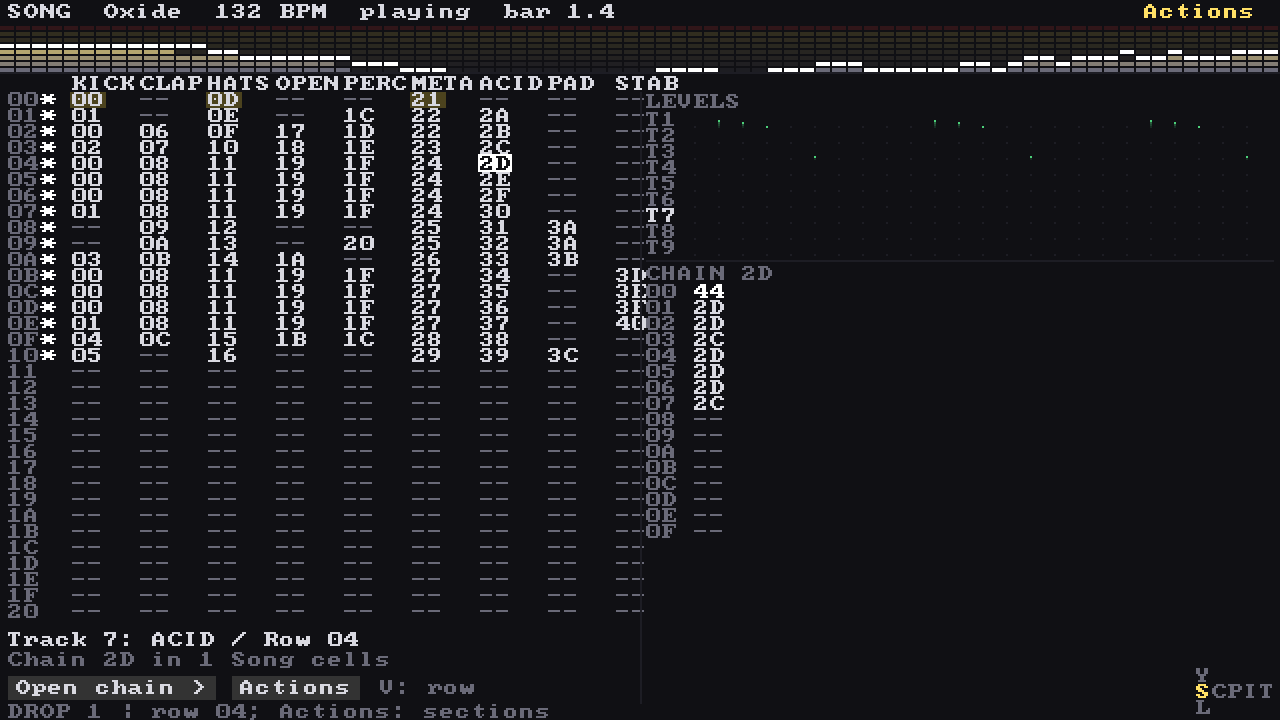
Levels
See every track move
On wider screens a LEVELS panel sits beside the song and shows each track's activity while it plays, with a peek at the chain under the cursor.
- 01
Song, chain, phrase
The tracker workflow from LSDJ and the M8, fully playable on a gamepad. Tables, grooves, per-step effect commands and reusable effect racks.
- 02
Help built in
Press Help on any screen and it opens on the control under the cursor, with the buttons you actually use. The full manual and a reference for every engine and effect are inside the app, offline.
- 03
A mixer with meters
Levels and meters for every track.
- 04
Effects
Insert effects on every track, about nineteen types, and send effects: reverb, delay and chorus.
- 05
Export to WAV
Render the whole song to a WAV file, or every track as its own stem.
- 06
Undo and history
Undo, redo and an edit history, so you can try things without losing work.
- 07
Designed for any device
Designed to run on handhelds as modest as the R36S. A project can be set to Eco, Balanced or Max: Eco uses a lighter reverb and fewer voices, Max the richest reverb.
- 08
A second screen
Optional: on a dual-screen handheld or a second monitor, a companion screen shows meters, the output waveform, the amp envelope or a table while you edit on the main one.
- 09
Visualizers
A small visualizer band on each screen, chosen per screen, plus a full-screen visualizer page. Optional: switch them off per screen or everywhere.
Tested with
Devices
- R36S
- Anbernic RG34XXSP
- AYN Thor
Systems
- ArkOS
- muOS
- Android
- Windows
- Linux
- Steam Deck
Tested with the R36S, the Anbernic RG34XXSP and the AYN Thor, on ArkOS, muOS, Android, Windows, Linux and Steam Deck.